
Not every plan is a trip. Most weeks the real question is smaller: what are we doing this weekend? SwipeSights now answers that one too.
Weekend is a new tab in the iPhone app: a weekend planner for your Friday, Saturday and Sunday in the city you are in, on your own or with friends.
How does the weekend planner work?
A few quick questions, then the plan.
- Pick your days. Tick Friday, Saturday, Sunday, or all three, and say who is coming.
- Set a budget. Whatever costs more than that stays out.
- Describe it or swipe. Say what you feel like in a sentence, or swipe through places and events on those days.
- Get the plan. A few things to do on each day, one for each part of it.
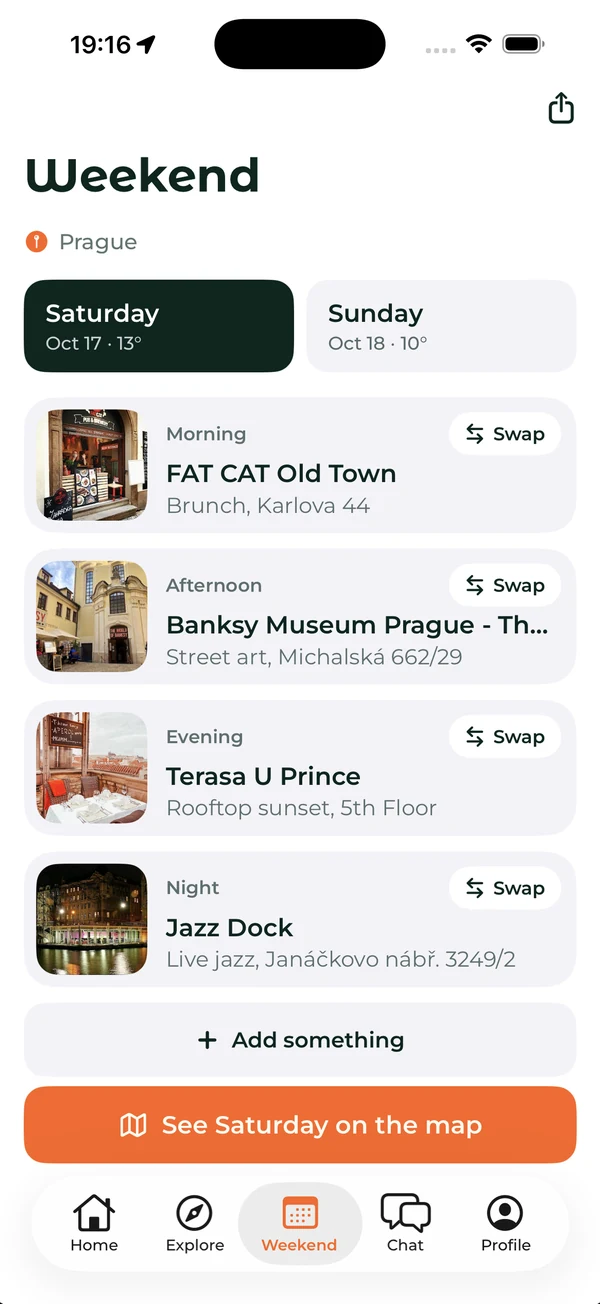
How is a weekend plan different from a trip plan?
A trip plan fills a day with sights in walking order. A weekend plan is not a sightseeing route. It is one thing for the morning, one for the afternoon, one for the evening and one for the night.
The interests are yours to name. Pick from food, drinks, a picnic, hiking, bars or sports, or type your own, like karaoke or live jazz. Turn on events and the concerts and shows on those days join in.
What if I don’t like one of the stops?
Every stop has a Swap button that brings the next best place of its kind. You can also move a stop to another day, take it out, or add something, including any place you find in Explore.
How do I make weekend plans with friends?
Share the weekend with a friend, a group, or anyone with the link. Everyone swipes, and their picks become the plan, the same way a trip is decided. No more asking the group chat for weekend ideas and getting three thumbs and no answer.
Frequently asked questions
Is there an app to plan a weekend with friends?
Yes. Weekend in the SwipeSights iPhone app plans your Friday, Saturday and Sunday. Share it with a friend or a group, everyone swipes, and their picks become the plan.
Do I need to be travelling to use the weekend planner?
No. Weekend is made for your own city, and it works in any city you pick. Trips have their own planner in the same app.
Can I change the weekend plan?
Yes. Swap any stop for the next best place of its kind, move it to another day, take it out, or add something, including a place you found in Explore.
Does the weekend planner include events?
Yes. Turn on events and the concerts and shows on your days are part of what you can pick.
Which weekend is yours?
Weekend is in the SwipeSights iPhone app. Update it, or get it on the App Store.



SwipeSights: plan the whole group trip together, and the weekends in between.