SwipeSights for work trips
Work trips your colleagues actually enjoy
Offsites, conferences and team trips: everyone picks from one link, and SwipeSights turns it into one plan for the time off.


who's in?
Everyone picks from one link
Drop the link in the team chat. Colleagues swipe on real places in their browser, with nothing to install, from the Sagrada Família to the beach.
 SwipeSights
so, what's the plan?
The team's favorites, first
See what everyone loved, place by place, before the plan is built. No polls in the chat, no guessing what the team wants.
working thursday and friday?
Plan the free day, keep the meetings
Plan just the time off. Each day stays in one part of town, in walking order, with lunch and dinner where you'll be, and the plan goes into Apple or Google Calendar.
who paid for the taxis?
Split what the company doesn't cover
Log what everyone paid and pick who shares each cost. The app works out who owes whom, so you settle up once, at the end.
where's everyone?
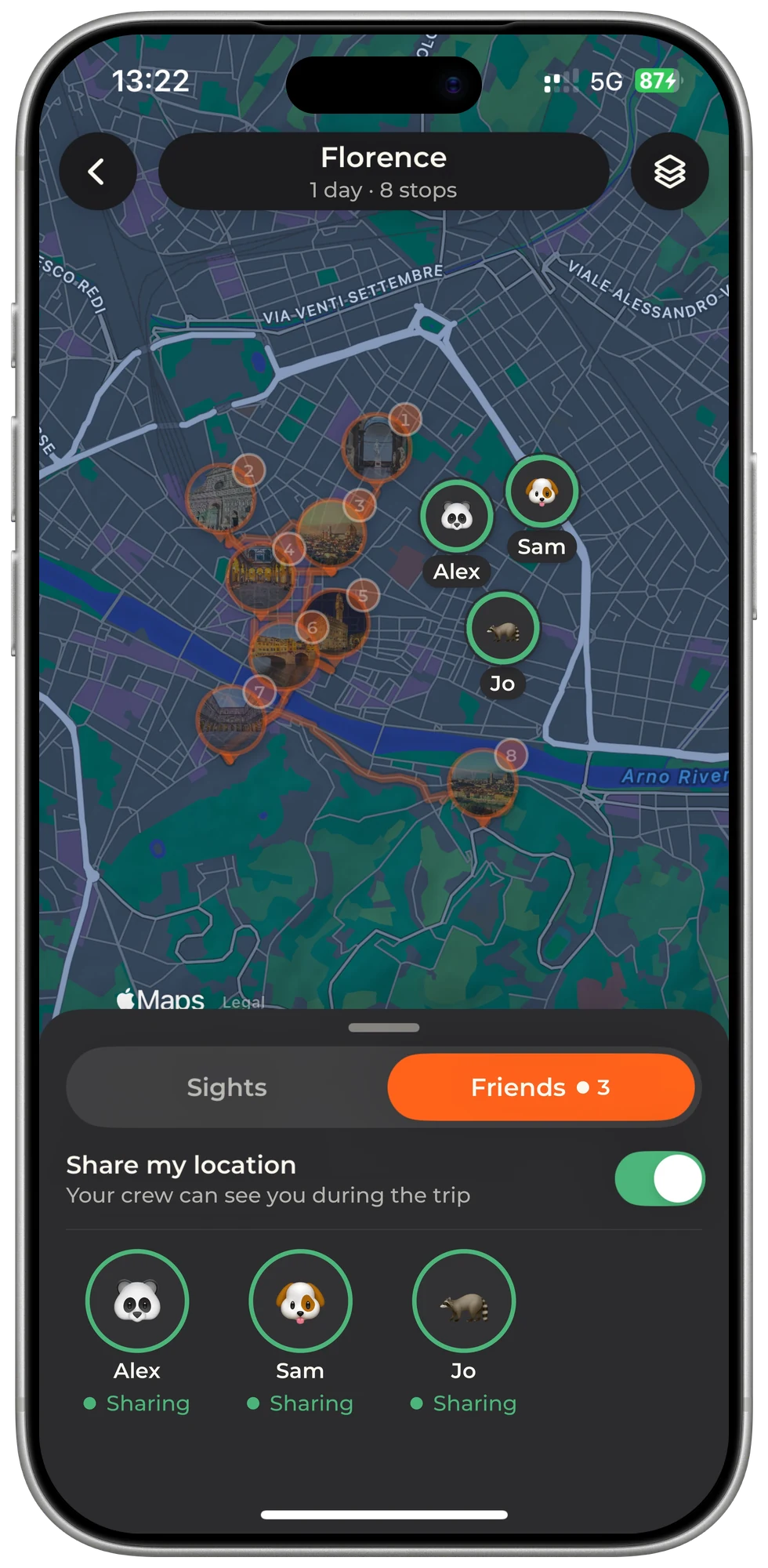
Find the team on the map
On the day, the plan is on the map, and colleagues who share their location show up on it, so nobody gets lost on the way to dinner.
“Good for group planning.”
organizing for the whole company?
SwipeSights for teams
Offsites, retreats and team days, for HR, people and office managers. We set up the first trip with you.
questions?
Work trips, answered
Can I use SwipeSights for a work trip with colleagues?
Yes. Start a trip for the city and your dates, send the link to your colleagues, and everyone swipes on real places. SwipeSights turns the team's picks into a day-by-day plan, each day in one part of town and in walking order.
How do we plan a team offsite together?
Drop the trip link in your team chat. Everyone swipes on real places on their own phone, you see what the team loved, place by place, and the places most people like become the plan.
We are working most of the trip. Can we plan only the free time?
Yes. Plan just the days you are free, like the Saturday after a conference, and add the plan to Apple Calendar or Google Calendar so it sits next to your meetings.
Do my colleagues need to download the app?
No. Colleagues open the link and swipe in the browser, with no account and nothing to install.
How much does it cost, and how big can the team be?
Unlimited trips are free: the itinerary opens 3 days, for groups of up to 3. A Trip Pass from $12.99 or a Year Pass from $29.99 opens every day and groups of up to 20, and one person's upgrade covers the whole group. See pricing.
How do we split the costs the company does not cover?
Log what everyone paid and pick who shares each cost. The app works out who owes whom, so you settle up once, at the end.
Do you plan trips for whole companies?
Yes. If you organize offsites or team trips for a company, see SwipeSights for teams: we set up the first trip with you.
Plan the team trip
Start a trip, drop the link in the team chat, and let the votes decide.